Please note that this is a digital software download and is not a physical CD-ROM. After purchase, you will receive a welcome letter email within two business days with a link and a key code to access Typing Instructor for Kids (for Windows). System Requirements for Windows Pentium® P4 • Microsoft® Windows® 10, Windows 8, or Windows 7 • 480 MB Hard Disk Space • CD-ROM Drive • 800 x 600, 16-Bit or Higher Display • 16-Bit Sound Card • Speakers or Headphones • Mouse
Typing Instructor for Kids Gold Digital (Windows)
SKU
076982
Grade 3-AD
Neutral
Low Teacher Involvement
Multi-Sensory
Sequential
These icons are designed to help you quickly understand and learn important information about our products.
Teaching Method
Traditional
Teacher-centered curriculum commonly used in classrooms that may include a text, teacher manual, tests, etc.
Charlotte Mason
A methodology based on the work of a 19th century educator who maintained that children learn best from literature (Living Books), not textbooks.
Classical
A methodology based on the Latin Trivium (three stages of learning), including the grammar stage (memorization and facts), logic stage (critical thinking), and rhetoric stage (developing/defending ideas).
Unit Study
A thematic or topical approach centered around one topic that integrates multiple subject areas.
Montessori (Discovery)
A methodology based on the work of a 20th century educator that emphasizes student and sensory-driven discovery learning and real-life applications.
Other
Other methodologies
Religious Content
Secular
Contains content contrary to common Christian beliefs (i.e. evolution).
Neutral
Avoids religious or theoretical topics or presents multiple viewpoints without preference.
Christian/Religious
Faith-based or including instructional religious content.
Learning Modality
Auditory
Learns through listening, talking out loud or reading out loud.
Visual
Learns through seeing, prefers written instructions and visual materials.
Kinesthetic/Tactile (Hands-On)
Learns through moving, doing and touching.
Multi-Sensory
Curriculum that employ a variety of activities/components.
Presentation
Sequential
Curriculum progresses through well-defined learning objectives. Emphasizes mastery before moving to the next topic.
Spiral
Topics and concepts are repeated from level to level, adding more depth at each pass and connecting with review.
Conceptual/Topical
Focus is on the “why,” often with a unifying concept as well as specific skills; coverage may be broader.
Teacher Involvement
Low Teacher Involvement
Student-led materials; parent acts as a facilitator.
Medium Teacher Involvement
A mix of teacher-led time and independent student work.
High Teacher Involvement
Teacher-led lessons; may utilize discussions, hands-on activities and working together.
Additional Materials Required
No other materials needed
Everything you need is included.
Other Materials Required
There are additional required resources that are a separate purchase.
Other Materials Optional
There are additional resources mentioned or recommended but are not absolutely necessary.
Consumable
Consumable
Designed to be written in; not reusable.
Non-Consumable
Not designed to be written in; reusable.
Our Price
$39.99 $39.99 $39.95
Rainbow Savings: $0.04
Digital Product
Product Overview
Important
Non-returnable. Is, or contains, a digital item. Non-returnable. Is, or contains, a digital item.Description
Publisher's Description of Typing Instructor for Kids Gold Digital (Windows)
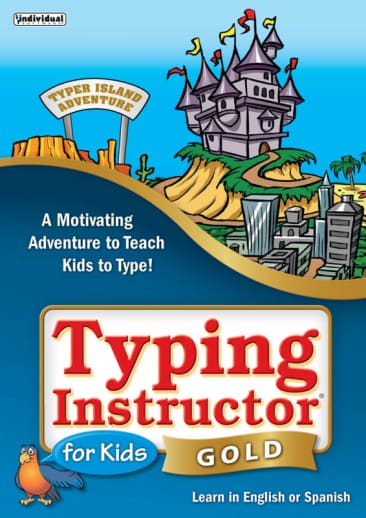
Typing Instructor for Kids Gold is the most advanced Typing Program available. It presents Typing Instructor in full-screen size and rich color for the optimum Typing Instructor experience for kids. No other Typing tutorial is more entertaining and educational.
Get your kids to the head of the class as they learn to become Touch Typists on a motivating adventure on Typer Island. Kids start their journey in the Old West at Wild Bill's Soda Shoppe. They'll learn to conquer the a, s, l, and ; keys, take on typing lessons, challenges, and games. The Typer Island Adventure is packed with so much fun and motivation, kids forget they are learning to type. "Boring" is not a word you'll hear as kids continue their Adventure in new lands, On the Water, In the Air, Over the Edge, and Under the Sea. Typing Instructor for Kids is the perfect typing solution for parents, too, as kids will not need help as they are guided step-by-step by Toby, a young boy, and his feathered-sidekick, Layfette. They help kids progress through the Adventure using just the keys they have learned.
Packed with Motivation
Kids are motivated to learn new keys, pass typing tests and complete challenges to earn coins, points, and jewels for their Treasure Chest. After completing typing activities in each land, the ultimate reward is reaching the Castle. Once at the Castle, kids become the ruler of Typer Island and embark on more adventures and games. The Castle's secret passageway takes them to the Lost City, a mysterious underwater city, filled with surprises and a challenging underwater scavenger hunt game.
Explorer Isle Cave
Kids can take a break from their typing adventure at any time to explore Typer Island. The Cave on Explorer Isle has an awesome game room where kids can choose to play any of Typer Island's games – except the exciting bonus games available in the Castle and the Lost City. They must reach the Castle to play those games. Kids can choose to take more lessons or challenges on Explorer Isle. They can also visit Story Lagoon and practice their skills by typing a favorite story from literature, such as excerpts from The Adventures of Tom Sawyer, a nursery rhyme, a classic book, or a fairy tale.
Adventurer Tools
Typer Island has a lot of Adventurer tools for kids to find their way around the Island. Aboard the Tour Ship kids can learn everything about Typer Island! A convenient Map Room helps kids see where they are on their Typer Island Adventure, where they are going next, and what keys they will learn. The Treasure Chest shows what new coins and points they have earned. Kids can display a variety of graphs in the Saved Results area to see their performance on all their typing activities; lessons, challenges, stories and even games. They can see their progress and the keys on the keyboard they need to practice.
Hours of Fun
Typer Island has unique games to keep kids interested in playing. This repetitive activity builds finger-to-key memory and before they know it, they are well on their way to becoming Touch Typists! Games can be played in a wide variety of ways; at varying levels of difficulty to keep kids interested in continuing to the next level. Games can be played with just the keys they have learned so far, or with all the keys on the keyboard.
Adventure Settings
There are a lot of choices on Typer Island. Kids can select English or Spanish and a Typing Plan that fits their skill level – there are 11 unique plans! They set their goal word per minute, which can be adjusted, if needed, at any time.
System Requirements
Pentium® P4 • Microsoft® Windows® 10, Windows 8, Windows 7, or XP • 480 MB Hard Disk Space • CD-ROM Drive • 800 x 600, 16-Bit or Higher Display • 16-Bit Sound Card • Speakers or Headphones • Mouse
Category Description for Typing Instructor for Kids
Typing Instructor for Kids is a fun, story-based typing program that teaches touch-typing skills to children through an engaging island adventure. Students take a journey across Typer Island, visiting five colorful lands (Old West, On the Water, In the Air, Over the Edge, and Under the Sea) on their way to capturing the Castle. As they learn new keys, they complete exciting typing challenges and mini-games that feel more like play than practice.
Key Features of the Program
- 160 structured touch-typing lessons covering all keys on both standard and split keyboards
- 10 different typing plans tailored to different age and skill levels
- 3D animated hands and on-screen keyboard for clear visual instruction
- 30+ arcade-style games that increase in number as students make progress
- Story Lagoon with 40 familiar stories (fairy tales and classic literature) for typing practice
- Progress tracking with instant feedback on speed (words per minute) and accuracy
- Rewards, treasure, and points to keep kids motivated
- Available in English or Spanish
Two versions are available:
- Gold: The most current version with updated graphics
- Platinum: The previous edition (still excellent!)
Choose from Windows (PC), Mac, CD-ROM, or digital download. Please see individual product pages for detailed system requirements.
Typing Instructor for Kids is an award-winning program that makes learning to type enjoyable and effective. Its careful progression, high-quality animation, and game-based approach help children build solid keyboarding skills while having fun.
Browse all Typing Instructor for Kids options (Gold & Platinum) for Windows and Mac below!
Details
| Product Format: | Other |
|---|---|
| Grades: | 3-AD |
| Brand: | Individual Software Digital |
| EAN/UPC: | 018527501443 |
Videos
Reviews