System requirements for Windows: Windows 11/10/8, Pentium® P4, 580 MB Hard Drive Space, 800 x 600 16-Bit or Higher Display, 16-Bit Sound Card, Speakers or Headphones
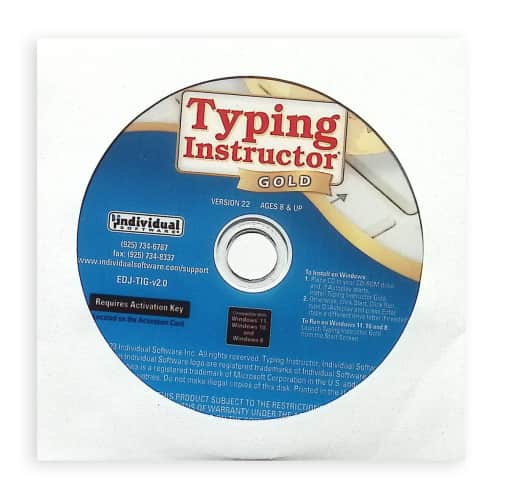
Typing Instructor Gold CD (Windows Version)
SKU
045999
Grade 3-AD
Neutral
Low Teacher Involvement
Multi-Sensory
Sequential
These icons are designed to help you quickly understand and learn important information about our products.
Teaching Method
Traditional
Teacher-centered curriculum commonly used in classrooms that may include a text, teacher manual, tests, etc.
Charlotte Mason
A methodology based on the work of a 19th century educator who maintained that children learn best from literature (Living Books), not textbooks.
Classical
A methodology based on the Latin Trivium (three stages of learning), including the grammar stage (memorization and facts), logic stage (critical thinking), and rhetoric stage (developing/defending ideas).
Unit Study
A thematic or topical approach centered around one topic that integrates multiple subject areas.
Montessori (Discovery)
A methodology based on the work of a 20th century educator that emphasizes student and sensory-driven discovery learning and real-life applications.
Other
Other methodologies
Religious Content
Secular
Contains content contrary to common Christian beliefs (i.e. evolution).
Neutral
Avoids religious or theoretical topics or presents multiple viewpoints without preference.
Christian/Religious
Faith-based or including instructional religious content.
Learning Modality
Auditory
Learns through listening, talking out loud or reading out loud.
Visual
Learns through seeing, prefers written instructions and visual materials.
Kinesthetic/Tactile (Hands-On)
Learns through moving, doing and touching.
Multi-Sensory
Curriculum that employ a variety of activities/components.
Presentation
Sequential
Curriculum progresses through well-defined learning objectives. Emphasizes mastery before moving to the next topic.
Spiral
Topics and concepts are repeated from level to level, adding more depth at each pass and connecting with review.
Conceptual/Topical
Focus is on the “why,” often with a unifying concept as well as specific skills; coverage may be broader.
Teacher Involvement
Low Teacher Involvement
Student-led materials; parent acts as a facilitator.
Medium Teacher Involvement
A mix of teacher-led time and independent student work.
High Teacher Involvement
Teacher-led lessons; may utilize discussions, hands-on activities and working together.
Additional Materials Required
No other materials needed
Everything you need is included.
Other Materials Required
There are additional required resources that are a separate purchase.
Other Materials Optional
There are additional resources mentioned or recommended but are not absolutely necessary.
Consumable
Consumable
Designed to be written in; not reusable.
Non-Consumable
Not designed to be written in; reusable.
Our Price
$39.99 $39.99 $31.95
Rainbow Savings: $8.04
Description
Publisher's Description of Typing Instructor Gold CD (Windows Version)
Typing Instructor Gold is the most advanced Typing Program available.
It presents Typing Instructor in full-screen size and rich color for the optimum Typing Instructor experience for typists. No other Typing tutorial is more entertaining and educational.
Pack your bags and get ready to go on a Worldwide Typing Adventure! Travel through time, go on Safari, or take a trip around the world as you learn to type or improve your typing skills. Typists begin their adventure in the Travel Port where they select a unique travel adventure. First stop: the prehistoric era, or Antarctica, or Australia! Each typing adventure is packed with so much fun and motivation, typists forget they are learning to type. They’ll progress through the Adventure by taking lessons, tests, typing challenges and playing fun typing games using just the keys they have learned and practiced in lessons and tests. When they complete the typing activities at a destination, they’ll receive a stamp in their passport. When the passport is full, they have completed the adventure and are on their way to becoming Touch Typists.
Adventure Settings
There are many program controls in Typing Instructor. Typists can select English or Spanish and a Typing Plan that fits their skill level – there are 20 unique plans! Typists can even build their own custom plan, as well as adjusting their goal word per minute at any time.
PC System Requirements
Pentium® P4 • Microsoft® Windows® 11, Windows 10, or Windows 8 • 580 MB Hard Drive Space • 800 x 600 16-Bit or Higher Display • 16-Bit Sound Card • Speakers or Headphones
Category Description for Typing Instructor
Typing Instructor is a popular, self-paced typing program that teaches keyboarding skills through an engaging travel adventure theme. Students begin at a travel port and “journey” around the world, earning passport stamps as they complete lessons, games, and typing tests. Colorful photos of world destinations appear throughout, making practice feel like an exciting trip rather than a chore.
Designed for ages 8 and up, the program combines structured lessons with fun, motivating activities to help students improve speed, accuracy, and confidence at the keyboard.
Key Features of the Program
- Progressive lessons that teach proper finger placement, posture, and typing technique
- Practice Center with hundreds of real-world typing exercises from books, articles, and short stories
- Arcade featuring 12 fun typing video games
- Dictation exercises and customizable practice options
- Detailed feedback on words per minute (WPM), accuracy, and progress tracking
- Helpful tools including a “How to Type” reference guide and a short history of typing
- Printable achievement certificates to celebrate milestones
Lessons and activities are available in English or Spanish. The program provides immediate feedback and allows students to work independently at their own pace.
Important Details
- Internet connection required for initial registration and activation only (not needed for daily use).
- Available for Windows (PC) or Mac, or as a dual-platform set that includes both versions.
- Software comes in a plain paper sleeve with basic installation instructions.
Typing Instructor is a great choice for homeschool families who want a motivating, game-enhanced typing program that goes beyond basic drills and keeps students engaged through a fun travel theme.
Browse all Typing Instructor options below, including single-platform and dual Mac/PC sets.
Details
| Product Format: | Other |
|---|---|
| Grades: | 3-AD |
| Brand: | Individual Software |
| Length in Inches: | 5 |
| Width in Inches: | 5 |
| Height in Inches: | 0.125 |
| Weight in Pounds: | 0.05 |
Videos
Reviews